EU and UK food law lists 14 allergens that guests must be able to get information about for every dish: gluten, crustaceans, eggs, fish, peanuts, soya, milk, tree nuts, celery, mustard, sesame, sulphites, lupin and molluscs. This article explains how to show them on a printed and a digital menu, and how to keep the information up to date.
What are the 14 allergens?
Food law names 14 substances or products that cause allergies or intolerances. A guest must be able to see, or ask, which of them a dish contains. They are: cereals containing gluten (such as wheat, rye, barley and oats), crustaceans, eggs, fish, peanuts, soybeans, milk (including lactose), tree nuts (such as almonds, hazelnuts, walnuts and cashews), celery, mustard, sesame seeds, sulphur dioxide and sulphites (above a set concentration), lupin and molluscs.
The full list, with its exceptions, is in Annex II of Regulation (EU) No 1169/2011.
Allergen labelling rules in short, including Natasha's Law
In broad terms, the regulation asks that information about these 14 allergens is available, also for food that is not prepacked, such as a dish in a restaurant or a sandwich made at the counter. How that information may be given, for example in writing on the menu or orally on request, and under which conditions, is set by each country.
In the UK, the Food Standards Agency publishes allergen guidance for food businesses and separate labelling guidance for food that is prepacked for direct sale. Those labelling rules are often called Natasha's Law. Broadly, they concern food that is packed before the customer chooses or orders it and is sold from the same premises where it was packed, such as a sandwich packed on site before the customer orders it. For the exact scope and what the label must show, check the guidance of the competent authority.
This article is a practical explanation, not legal advice. For the exact rules, read the regulation and the guidance of the authority in your country.
How to show allergens on a printed menu
On paper there are two common approaches. You show the allergens per dish on the menu, with symbols or numbers and a key. Or you keep a separate allergen menu or allergen matrix: a table with every dish in the rows and the 14 allergens in the columns.
A few practical points:
• Work from the recipe and your suppliers' labels, not from memory.
• Include sauces, dressings, garnishes and frying oil.
• Use the same symbols everywhere and print the key on every menu.
• Agree who in the team answers allergen questions, and where that person finds the overview.
• Put a date on the menu so you can see which version is on the table.
Allergen filters on a digital menu
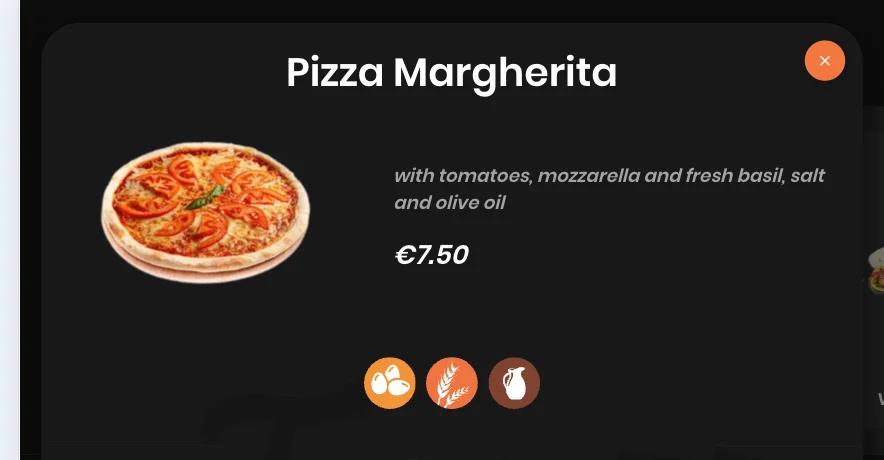
On a digital menu you enter the allergens per product. Guests see them with the dish and can filter the menu themselves by allergen and dietary preference. In Jamezz you record the allergens per product in the back office. The allergen and diet filters work in every ordering channel: QR code ordering, the self-ordering kiosk, the tablet and the webshop.
You can also create your own labels of the type allergen, preference or brand, with an icon that guests see with the product. Prefer to start with a menu only, without ordering? That is possible with a digital menu with QR code.
Allergens for international guests: translated menus
A guest who cannot read the language of the menu misses the allergen information first. In Jamezz, menu texts are translated automatically with AI; you choose the languages and adjust a translation where needed. The name of a label you created can be translated automatically and can then be changed per language. The guest's language is detected automatically.
You enter the allergens per product yourself. So check for yourself that the information is right in every language, and read translations through before you use them. A wrongly translated ingredient is more than a language error.
Keeping allergen information up to date: a checklist
The information is only right as long as someone maintains it. This checklist helps:
1. One person responsible. Appoint one person who makes the changes on the menu and in the ordering system.
2. Recipe changes: update the allergens the same day, also when you switch to another brand of sauce or stock.
3. Supplier changes: check the new label; the same product name can have a different composition.
4. New dish: it only goes on the menu once the allergens have been filled in.
5. Fixed check: go through the whole menu at a set moment, for example with every menu change.
6. The team remains the point of contact. A guest with an allergy must always be able to ask; the menu does not replace that conversation.
You will find more terms in the glossary. Want to see how allergens and filters look in your own menu? Request a demo.
Frequently asked questions
What are the 14 allergens on a menu?
Cereals containing gluten, crustaceans, eggs, fish, peanuts, soybeans, milk, tree nuts, celery, mustard, sesame seeds, sulphur dioxide and sulphites, lupin and molluscs. The list is in Annex II of Regulation (EU) No 1169/2011.
Do I have to list allergens on my menu?
The rules ask that information about the 14 allergens is available for every dish. In which form that is allowed, for example on the menu or orally on request, is set by each country. Check the regulation and the guidance of the authority in your country, in the UK the Food Standards Agency; this is not legal advice.
What is Natasha's Law and who does it apply to?
Natasha's Law is the name commonly used for the UK rules on labelling food that is prepacked for direct sale: broadly, food that is packed before the customer chooses or orders it and is sold from the same premises where it was packed. The Food Standards Agency publishes the guidance; check with the competent authority what applies to you.
Can guests filter a digital menu by allergen?
Yes. With Jamezz, guests filter by allergen and dietary preference themselves, in every ordering channel: QR ordering, kiosk, tablet and webshop.
Are allergens shown in every language of the menu?
You enter the allergens per product yourself. In Jamezz, menu texts are translated automatically with AI and you can adjust a translation yourself; the name of your own label can be translated manually per language. Whether the allergen information is right in every language is for you to check: always read translations through.
Who is responsible for the allergen information in an ordering system?
The venue enters the allergens per product and keeps them up to date. The ordering system shows what has been entered.
Share this article